
Tesla has added passkeys to its app. Biometric login without a password is now available on iPhones and Android devices.
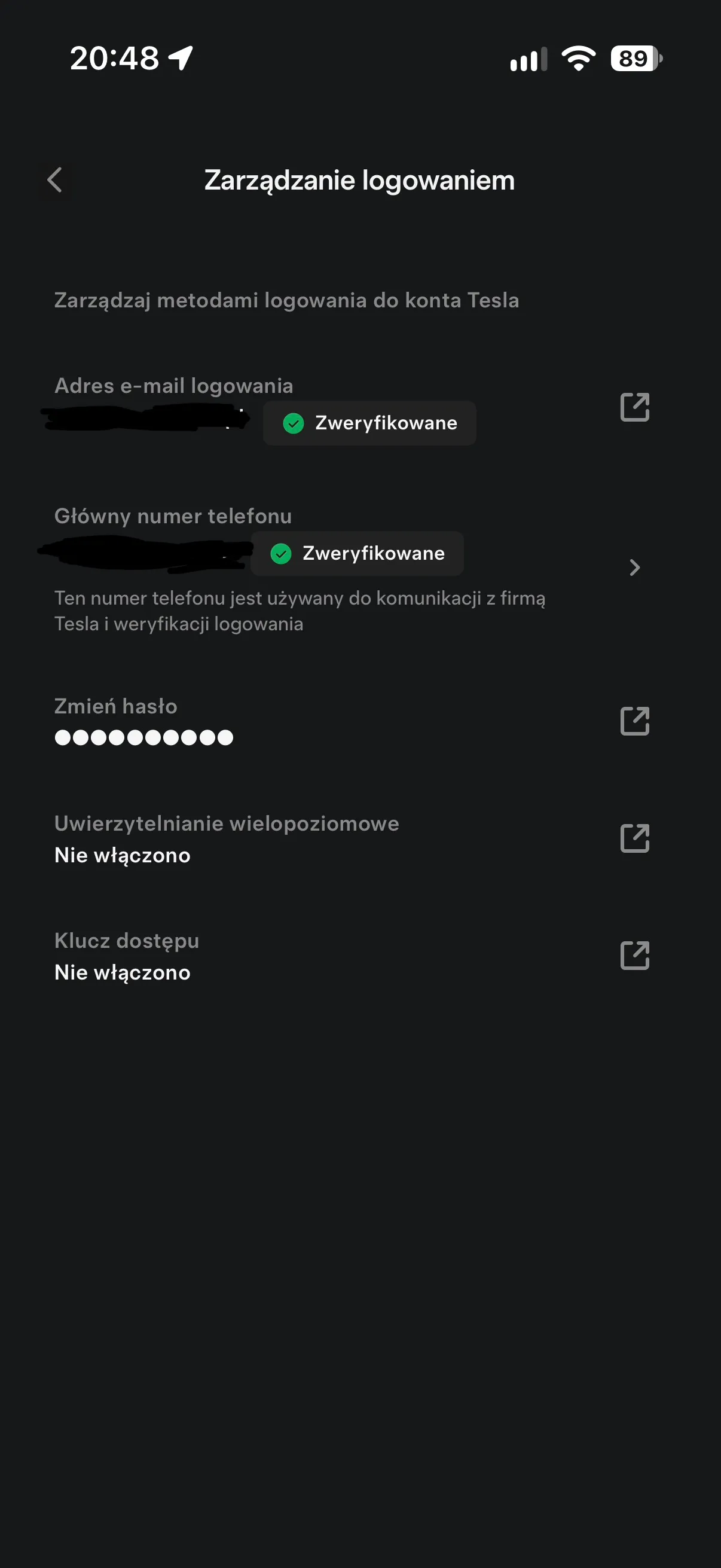
Tesla began implementing passkey support in the 4.61.0 mobile app. This feature first appeared on iOS and allows users to log in to their accounts using Face ID, Touch ID, or the device code, without entering a password.
For users, this represents a minor change in the interface, but it is quite meaningful from a security perspective. And here, Tesla’s marketing isn’t necessary, as the technology itself does the job.
How passkeys work in the Tesla app
A passkey is a digital login key linked to a specific device. Instead of a password, there are two cryptographic elements: a private key stored on the phone and a public key registered on Tesla’s servers.
The practical effect is simple. When logging in, the phone verifies identity through Face ID, Touch ID, or fingerprint instead of sending a traditional password that could be stolen on a fake site. Even if someone uses a counterfeit login screen, the device won’t release its private key because it doesn’t receive a valid request from Tesla’s servers.
This is why passkeys are now considered better than passwords and even some traditional 2FA methods. There’s less friction, fewer password resets, and less room for phishing.
In the Tesla app, configuration should take less than a minute. The steps are as follows:
Open the Menu.
Go to your profile and select Security & Privacy
Open Login Management.
Tap Access Key.
Select Add Passkey and follow the instructions on screen.
Once activated in the Login Management section, the passkey should appear as enabled, right below the multi-factor authentication status.
Android Will Also Get This Feature, with Tesla Planning Bigger Changes to the App
Version 4.61.0 is also coming to Android. Logging in there is expected to work similarly, using fingerprint and Google Account management. Tesla hasn’t provided a separate list of differences between platforms, so on paper it seems symmetrical. We’ll see how it works in practice.
The second topic is more interesting. Larger changes to the Tesla app itself are planned in the background, partly inspired by solutions from the Robotaxi app. These include remote control of airflow direction, sliders for seat adjustments, control over ambient lighting, and viewing YouTube directly from the app.
For now, this is more of a direction than a complete list for all users. But passkeys are a good sign, as Tesla is finally improving something that truly affects every owner, not just those who follow FSD and Robotaxi day after day.
The most interesting part will be whether Tesla goes further and starts moving more features from its side projects into the regular app. Do you already use passkeys elsewhere, or are you still relying on passwords and 2FA?
Order your Tesla and take advantage of purchase bonuses using the referral link!
LovEV Newsletter
Want more content like this?
Sign up — we’ll send you a weekly summary once the newsletter launches.