
Tesla has added ad blocking in the browser. Older Teslas with Intel should breathe a sigh of relief.
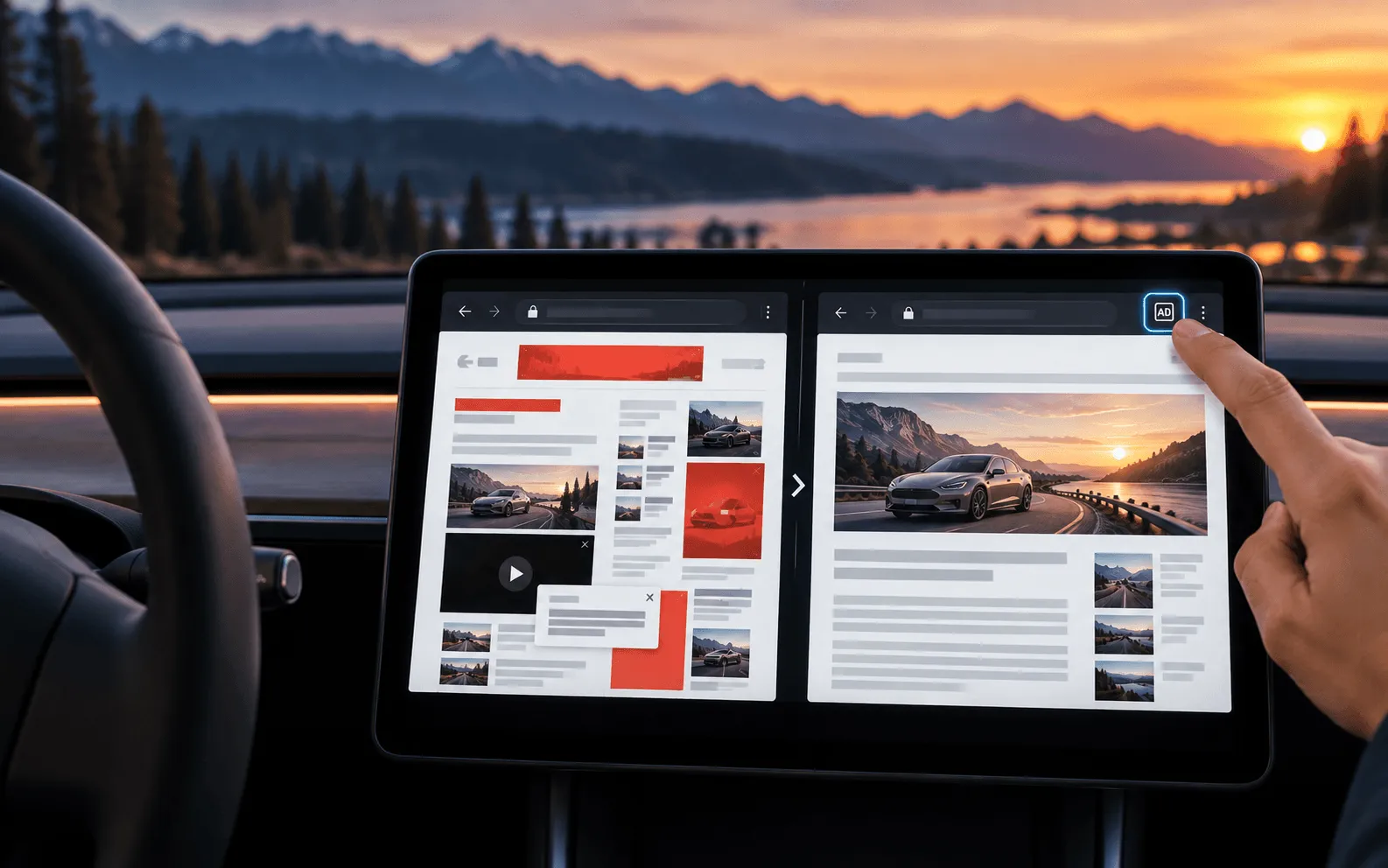
Tesla added a built-in ad blocker to the in-car browser in update 2026.32.3. The feature works by clicking a new AD button in the top right corner and is designed to speed up page loading, especially on vehicles equipped with Intel Atom processors.
It’s a small feature, but quite practical. No one in a car needs pop-up banners, autoplay content, or heavy tracking scripts that strain the processor.
Roland Pircher demonstrated on X how it works in version 2026.32.3. Once ad blocking is enabled, Tesla’s browser loads the same news site in a significantly cleaner format. Banners, pop-ups, and embedded videos disappear before they even have time to render.
The side effect is more important than screen order itself. Fewer items to load means less RAM usage, less work for the CPU, and lower data transfer costs with Premium Connectivity. It sounds trivial on paper, but in practice it can make a big difference.
Teslas with Intel Atom will benefit the most
newer Teslas with AMD Ryzen-based infotainment systems already work quite smoothly in browsers. This change will benefit owners of older cars with MCU 2 and Intel Atom processors even more, as heavier pages can slow down scrolling, delay touch responses, or even cause the screen to freeze after opening several tabs.
Here, an ad blocker serves a very specific purpose. If the browser doesn’t load advertising frameworks, trackers, and complex animations, more resources are available for the actual page content. There’s no magic involved—just reducing online clutter.
Tesla has not provided a separate menu for managing blocklists or whitelists for specific domains. For now, it appears to be a simple switch that operates in the background once activated. Since Tesla’s browser is based on Chromium, implementing such a feature is nothing unusual. What’s more interesting is how aggressive the filtering rules are and whether they will break certain websites.
This is another move following the changes in 2026.26
The new ad blocker did not appear out of nowhere. In the summer update 2026.26, Tesla granted the browser access to the internal camera so that video calls could be made from within the car. At that time, connections via Google Meet, Microsoft Teams, and Discord were also added, along with tab synchronization, full-screen video viewing, and improved page scaling.
The 2026.32 update also brings other new features, including a new interface for configuring wheels and tires as well as the ability to search one’s own Apple Music library.
It’s a small thing, but exactly the kind of feature a driver will use more often than half of the marketing fluff. Do you actually use the browser in Tesla, or is it still just a feature for when you’re parked?
Order your Tesla and take advantage of purchase bonuses using the referral link!
LovEV Newsletter
Want more content like this?
Sign up — we’ll send you a weekly summary once the newsletter starts.