
Charging an electric car is simple. In practice, Type 2 and CCS are sufficient.
The first time charging an electric car seems more daunting in photos than in reality. Several plugs, operator apps, RFID cards, Plug & Charge, various charging powers: at first glance, it might appear to be a complicated system that requires extensive learning.
Table of Contents
Show
Hide
In practice, it’s much simpler than it seems.
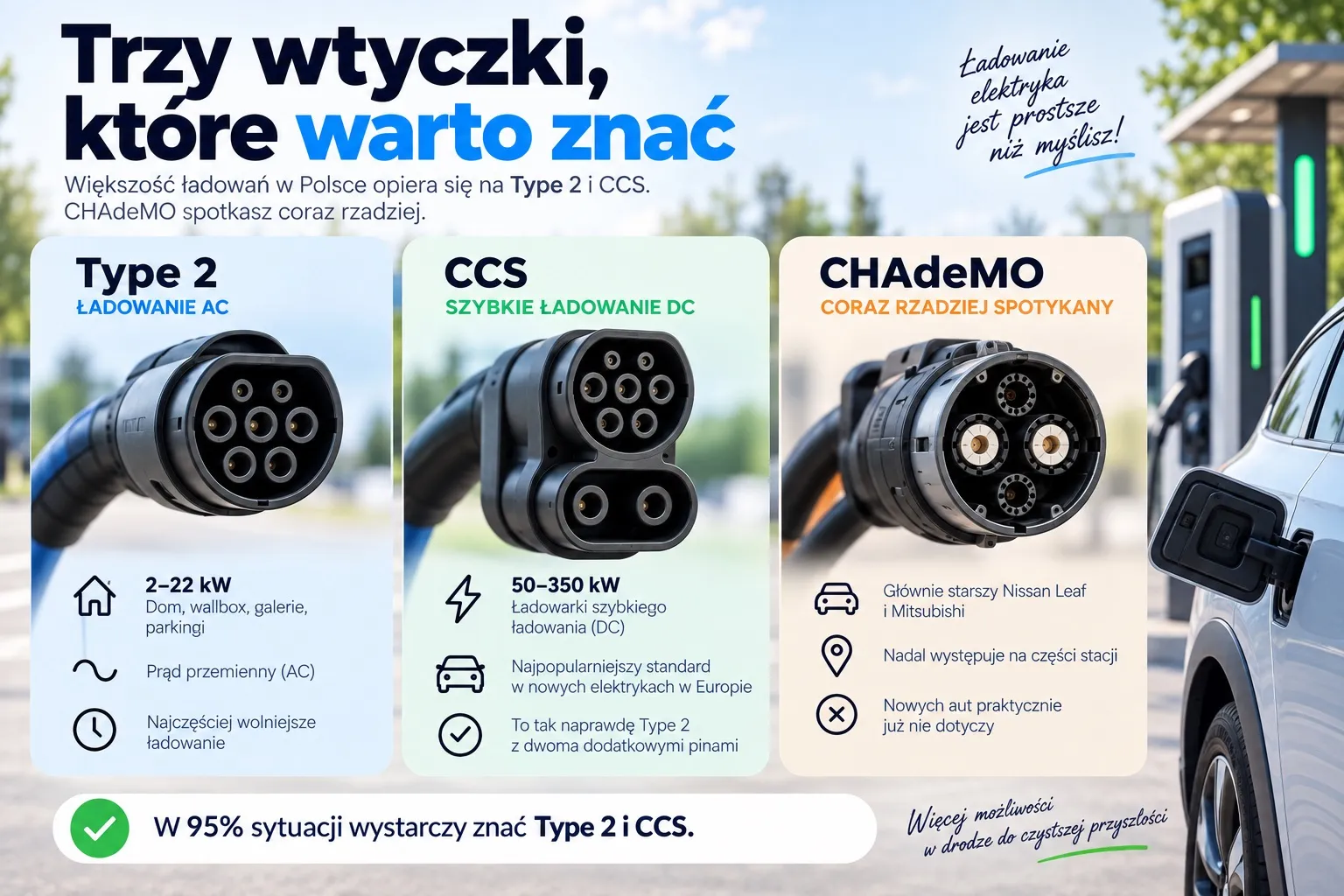
If you drive a modern electric car in Poland, you only need to remember two terms: Type 2 and CCS. Type 2 is an AC charging connector that you can use at home, with a wallbox, or at standard public chargers. CCS is used for fast DC charging, which you’ll find mainly on highways and during longer trips.
In addition to this is the issue of authentication, or how to start a charging session. Depending on the car and charger, you can simply plug in a cable, use an app, tap an RFID card, or pay with a credit card. It sounds more complicated than it actually is. After the first charge, most of these steps become obvious.
It’s really simpler than filling up with gas
With a gasoline car, we also have several steps: you choose the right fuel, drive up to the appropriate pump, fill up, and pay.
With an electric car, it looks similar but is simpler: you park, open the hatch, plug in the cable, and start charging. Sometimes you don’t even need to do this last step, as the car and charger automatically recognize each other thanks to the Plug & Charge feature.
You don’t need to know all of the charging standards in the world either. In Europe, including Poland, new electric cars mainly use Type 2 and CCS. CHAdeMO can still be found, but primarily in older models.
So remember one rule:
Type 2 = AC, which means generally slower charging.
CCS = DC, which means fast charging.
What plugs will you find in Poland?
Type 2, or AC charging
Type 2 is the standard connector for alternating current (AC) charging. You’ll find it in, among other places:
home wallboxes,
public AC chargers,
shopping malls and parking lots,
hotels and office buildings.
Public AC chargers usually offer 11 or 22 kW of power, though lower values are also available.
One thing to remember: the power specified on the charger does not always reflect the actual charging power for the car. If the charger offers 22 kW while the car can accept up to 11 kW AC, charging will still be limited to 11 kW. This is normal because the car and charger communicate with each other to determine safe charging parameters.
Type 2-Type 2 Cable, or the Trunk Cable
Here, beginners might encounter a small issue: not every AC charger comes with its own cable.
Some public AC charging stations simply have a Type 2 socket. In such cases, you need to use your own Type 2-Type 2 cable, connecting one end to the car and the other to the socket on the charger.
It’s a simple cable, but it’s useful to have on hand. You might encounter two situations:
An AC charger with its own cable. In this case, you take the cable from the station and connect it to the car.
An AC charger with just the plug. You use your own Type 2-Type 2 cable: connect one end to the car and the other to the charger.
This is why electric vehicle owners often keep a cable in their trunk that drivers switching from gasoline cars don’t expect at all.
CCS, or DC fast charging
CCS is a standard for fast charging with direct current (DC). The CCS plug looks like a Type 2 plug, except with two large contacts added at the bottom. These allow significantly higher power to be delivered to the car.
At DC stations, you’ll find chargers with capacities of 50, 100, 150, 200, 300 kW, and sometimes even over 300 kW. However, this doesn’t mean every car can be charged at such high power. If a vehicle has a maximum DC charging capacity of 100 kW, connecting it to a 350 kW charger won’t cause it to suddenly start drawing 350 kW, as with AC charging, the car controls the entire process.
The CCS cable is almost always available at DC stations. It’s thick and heavy, so unlike the Type 2-Type 2 cable, no one carries it in the trunk.
CHAdeMO, a standard increasingly rare
CHAdeMO is an older fast-charging standard that can still be found at some public stations. It’s primarily associated with older vehicles, especially the Nissan Leaf, though some Mitsubishi and other manufacturers’ models also used it.
If you buy a new electric car for the European market today, CHAdeMO is usually not relevant to you. The situation is different when purchasing a used electric vehicle: in that case, it’s important to check what fast charging standard the specific model supports.
AC and DC, what exactly does it mean?
AC and DC sound technical, but for drivers they boil down to a simple principle. With AC, electricity flows into the car, and its onboard charger converts it for use by the battery. With DC, the conversion happens at the charging station, and energy reaches the battery directly. That’s why DC charging is often much faster.
Type
Typical power
Where it’s most common
AC
up to about 22 kW
homes, wallboxes, shopping malls, parking lots, hotels
DC
from about 50 kW upwards
highways, charging stations, charging hubs
However, this doesn’t mean DC is always the better choice. AC works well in everyday situations where the car stays parked for several hours, while DC is invaluable on the road when you need to recharge a significant amount of energy in just a few minutes or tens of minutes to keep going.
Why do some cars have two charging ports?
This is another thing that might surprise someone new to electric vehicles: some models come with two charging ports, located on opposite sides of the vehicle body.
A good example is the Porsche Taycan. Depending on the version and market, one port supports both AC charging and DC charging via CCS, while the other is used solely for AC charging. A similar setup can be found in the Audi e-tron GT, where usually the right side of the body handles CCS charging and the left side handles AC charging.
Two ports don’t mean two separate fast chargers; it’s mainly about convenience. If the charger is on one side of the car, you can drive over to easily connect the cable. For a different parking spot, the second port is more useful.
How to start charging?
Simply connecting the cable is just part of the whole process. The charger still needs to know who is using its power and how to account for the session. You have several options available.
Plug & Charge
This is the most convenient option. You drive up to a compatible charger, connect the cable, and the car identifies itself in the system automatically. You don’t need to open an app, select a station, or insert an RFID card.
There is one condition, however: the car, charger, and operator must support Plug & Charge, and the function must be properly configured. Not every car will therefore charge automatically at every station.
App
This is one of the most common ways to start a charging session. In the operator’s app, you can see available chargers, select a specific station, and begin charging. You will also find QR codes at some stations; scanning them takes you to a website or app where you can start the session and make payment.
It’s a good idea to have the apps of the operators you plan to use installed before a long trip. However, you don’t need to install dozens of them—several of the most popular ones are usually sufficient.
RFID Card
This is a popular solution for people who use chargers frequently. You insert a card into the reader at the station to start or end a session. The RFID card doesn’t have to be a credit card; it usually simply identifies your account with the operator or roaming service provider. It works somewhat like a key to the entire network of chargers.
Credit Card
At some stations, you can pay directly with a card without setting up an account with the operator or looking for an RFID card. This is a convenient option if you only use a particular charger occasionally. Keep in mind, however, that not every pillar has a payment terminal, so this option isn’t always available.
Your Own Cable or a Cable from the Station?
This is a question worth remembering, as it can save a lot of stress during your first charge.
AC. You often need your own Type 2-Type 2 cable, especially if the charger only has a socket.
The DC CCS cable is usually permanently attached to the charger.
A simple rule: with Type 2, the cable can be yours, but with CCS you’ll find it at the location. However, charger designs vary, so always check whether a cable is actually hanging at that station.
Tesla Supercharger, why is it even simpler with Tesla?
Tesla Superchargers have their own way of operation. If you drive a Tesla and have the service properly configured, it’s usually very simple: you plug in the cable, and the car is automatically recognized. You don’t need to select a station in the app every time.
The situation changes when you drive a car of another brand. Some Superchargers are available for other electric vehicles as well, but not all: availability depends on the specific location and whether your car is compatible with the infrastructure. In such cases, you usually need to use the Tesla app to select a station before starting a charging session.
If you drive an electric car from another brand and plan to charge at a Supercharger, check in the Tesla app first to see if that location is available for your car. Not every Supercharger works with every electric vehicle.
First Charging, Step by Step
Now that you know the types of connectors, it’s time for the most important part: what to do when you first approach a charger.
Park in the designated spot. Check where the socket is located inside the car and whether the cable from the charging station can reach it easily.
Open the charging hatch. Depending on the model, you will do this using a button, the screen, an app, or simply by pressing the hatch itself.
Select the appropriate connector. For AC charging, look for Type 2; for DC charging, look for CCS; in older cars, it might be CHAdeMO. If you encounter an AC charger without a cable, bring your own Type 2-Type 2 cable from the trunk.
Authorize the charge. Depending on the charging station, this may be done through an app, an RFID card, a credit card, or Plug & Charge. Sometimes the order is reversed—first connecting the cable and then starting the charging session. It is safest to follow the instructions on the charger’s screen.
Connect the cable. Plug the connector into the car’s socket. It may require a bit of force for DC connections since the CCS cable is heavy—this is normal. Once properly connected, the car and charger will automatically verify the connection.
Wait for charging to start. The car’s or charger’s screen will display information about the session beginning, current power level, and charging status.
End the session and disconnect the cable. Stop charging as indicated by the car or charger. If the cable is blocked, unlock the car or end the session first, then remove the connector and put the cable back in place. Of course, you take your own Type 2-Type 2 cable with you.
Frequently Asked Questions About Electric Vehicle Charging
Can the connector be mixed up?
This is one of the most common concerns among those who have not yet charged an electric vehicle. In practice, connectors come in various shapes, and it’s not possible to insert any plug into any socket.
It’s still worth knowing one detail: CCS uses the upper part of the Type 2 connector, so a CCS socket in a vehicle looks like a Type 2 socket, except with two additional large contacts at the bottom. However, you don’t need to memorize the connector’s structure—just look at the label on the charger: AC refers to Type 2, while DC refers to CCS. The vehicle itself usually also indicates what type of charging is connected.
Can you charge in the rain?
Yes. Vehicles, cables, and chargers are designed to be used outdoors in various weather conditions.
However, avoid working on damaged cables or equipment. If a cable or charger appears damaged, it’s better to choose another charging location.
Can you leave the car while it’s charging?
Yes. Once charging starts, the cable is usually locked in the car and can’t be pulled out easily, so you can go to a store, restaurant, or restroom without worry.
One thing to keep in mind: after charging is complete, don’t occupy the spot unnecessarily, especially at fast chargers where other drivers might be waiting their turn.
Does fast charging damage the battery?
No, at least not with a single or occasional DC charging session. Modern cars have advanced battery management systems that continuously monitor temperature, voltage, and charging power.
In practice, it is the car that determines how much energy it can accept at any given moment. If the battery is cold or the charge level is already high, the power output may be limited. Therefore, even a charger rated at 350 kW doesn’t necessarily have to charge the car at that power level all the time. This is normal.
It’s really not complicated
The first time charging might seem like dealing with a device that comes with a several dozen-page manual, but in practice, after a few sessions, most drivers don’t think about it at all. You drive up, check whether you need AC or DC charging. For AC, you might use your own Type 2-Type 2 cable, while for DC, you take a ready-made CCS cable from the station. Then you authorize the charging session using an app, card, or Plug & Charge, connect the car, and wait. That’s really it.
Key information in brief
Type 2 is the basic connector for AC charging.
CCS is used for fast DC charging.
CHAdeMO is mainly found in older vehicles nowadays.
For some AC chargers, you need your own Type 2-Type 2 cable.
In DC chargers, the CCS cable is usually permanently installed.
You can start a charging session using an app, RFID card, credit card, or Plug & Charge.
Tesla Superchargers automatically recognize Teslas, but availability for other brands depends on the specific station.
Not all cars can charge at the maximum power specified by the charger.
AC charging works best for daily use, while DC charging is better for long trips.
If you’re considering buying an electric car and your biggest concern is not knowing how to charge it, you can rest easy. The first charging session can be a bit stressful, the second is much simpler, and by the third time you’ll likely not even think about it.
How was your first charging experience? Was it stress-free, or did you feel a bit nervous watching the screen and wondering which button to press?
Order your Tesla and take advantage of the bonuses for purchasing through the referral link!